Turning music into 3D-printable discs for a 1970s Fisher Price toy record player — the story of why that toy is really a music box, a punch card and a record all at once, and a browser tool that burns any melody onto a disc you can print. Jump straight to the tool ↓
The idea
The Fisher Price "Music Box Record Player" (1971) looks like a tiny turntable, and that disguise is the whole trick. Drop a disc on, push the arm down, and it plays a tune — so a child assumes it works the way a real record does. It doesn't. There is no groove, no needle, and nothing recorded. Flip a disc over and you find a ring of little raised bumps, and under the platter, a comb of tuned metal teeth. As the disc turns, each bump reaches out and plucks a tooth. It's a music box — the record shape is costume.
That distinction is the reason this whole project can exist. A real record stores a continuous analog waveform; you can't author one with a 3D printer. But a bump is either there or not there, at a known angle, over a known tooth. That's not a recording. That's data — and data I can generate, lay out, and print. The goal: take a melody, work out which tooth plays which note at which moment, place a bump for every note, print the disc, drop it on the toy, and hear a song that never existed as a plastic part until I made it.
The lineage: pinned barrels and punched cards
Programmable music is much older than electricity, and the Fisher Price disc sits at the end of a very long family tree of physical music storage — machines that play a tune encoded as bumps and holes rather than as sound.
The pinned barrel (music boxes, carillons, barrel organs). A rotating cylinder studded with metal pins; each pin lifts a tuned comb tooth or opens an organ valve at the right moment. This is, mechanically, exactly what the Fisher Price player does — the toy just unrolls the barrel into a flat disc so it's cheap to mould and easy to swap.
The punched card and punched roll. The Jacquard loom (1804) drove weaving patterns from holes punched in stiff cards — arguably the first stored program of any kind. The same idea became player-piano rolls and the folding cardboard "books" of fairground and street organs: a hole means play, no hole means rest. Presence-or-absence, read position by position.
The printable disc. A bump on a Fisher Price disc is a punched-card hole turned inside out — instead of a gap that lets air or a hook through, it's a nub that trips a tooth. Same binary. The only new thing here is the medium: I'm not punching card or pinning brass, I'm extruding the pattern in plastic.
So the tool below is, underneath, a punch-card writer. You compose the pattern of "strike / don't strike," and it hands you a physical object that stores it.
What the arm can actually play
The comb is the constraint that shapes everything. This player has 22 teeth — but they aren't 22 different notes. Six pairs are tuned to the same pitch, so there are only 16 distinct pitches, spanning roughly two and a half octaves (about MIDI 66–97), and they're diatonic — laid out to a scale, not a chromatic keyboard. There are notes the toy simply cannot make.
Why tune two teeth alike? Because a plucked tooth needs time to stop ringing before it can be plucked again. If a tune repeats a note faster than a single tooth can settle, the second strike lands on a still-vibrating tooth and chokes. Two teeth at the same pitch let a fast repeat alternate across the pair — one rings while the other is struck. The tool knows about these "twins" and uses them automatically, which is why a descending line in the editor occasionally looks like it hops up a pin: that's the twin doing its job, at the same pitch.
The pitch table itself came from real measurement, not guesswork — bbernstone read every original disc with an electronic tuner and a printed disc-reader, and re-indexed the design by pin number instead of by note name, because on a mechanism like this the pin position is the honest unit. The tool is built directly on that pin-based geometry (see credits below).
Runs entirely in your browser — nothing you drop or design is uploaded. Downloads (.gcode / .scad / .json) work best from the tool's own tab.
From a MIDI file to a ring of bumps
Clicking bumps by hand works, but most people arrive with a song. Turning an arbitrary MIDI file into something a 16-pitch diatonic comb can play is the actual hard part, and it's most of what the tool does:
Reduce to one voice. A real song has chords and several instruments sounding at once; the comb plays one clear line best. The tool collapses the music to a single melodic line — keeping the top voice (or the bass, your choice) at each instant.
Move it where the toy can reach. A tune in the wrong key or octave lands mostly on notes the player doesn't have. It searches every transposition and picks the shift that puts the most notes exactly on real pitches — so the intervals survive and it still sounds like the tune, just relocated to the toy's range.
Respect the ringing-tooth rule. Two strikes on the same tooth too close together won't both sound. The tool spaces them, shuffles one onto a twin where it can, and tells you what it moved or dropped. There's a "check playability" button that flags any collision left.
Fill the disc. A bare melody is about ten bumps. A real factory disc carries 125+, a third of them chords — the tune was never the hard part, filling the disc was. The tool can read the chords already in the source and lay reachable harmony notes underneath the melody on a repeating rhythm, so the result sounds like a proper little arrangement rather than a lonely line.
Printing something that actually survives
A disc that plays and a disc that prints are two different design problems, and the tool carries settings for both:
The bumps are the fragile part. Each trigger is a tiny nub, and the default 1.2 mm width is chosen to be exactly three extrusion lines at a 0.4 mm nozzle — two walls and a filled centre. Make them thinner and they print hollow and snap off. The tool converts your nozzle size into line counts and warns when the number isn't whole.
The grooves can't be too walled-in. The concentric ring walls that guide the reading head sit a fixed distance apart, so each wall you thicken eats the channel the head runs in. The tool shows the leftover groove channel in millimetres and warns when it gets too narrow to work.
A normal slicer wrecks this part. Almost everything on the disc is a circle about its centre. A general slicer doesn't know that — it breaks each ring into segments and retracts at a seam on every ring of every layer, and those seams are where blobs and knocked-over triggers come from. So the tool writes the G-code itself, analytically, as continuous concentric passes, cutting retractions from a couple thousand to a few hundred. It still wraps that path in the full header/statistics envelope a real slicer emits, because the printer's firmware refuses a file without it.
Using the tool
Click bumps straight onto the piano roll, or drop a .mid file on the MIDI tab and hit Convert to disc.
Press Play to hear it — the pitches are the toy's real per-pin values (the timbre is a synthesised approximation of a struck tooth).
Load the calibration sweep (File tab) to strike every pin once in order — print that first to learn what each tooth on your comb actually sounds like.
Pick your printer on the Print tab, then download .gcode to print directly, or .scad to open the geometry in OpenSCAD yourself.
Always preview the G-code in a viewer before printing — it's generated from geometry, not sliced, and hasn't been babysat by a slicer.
Where it's at
This one is live on the bench right now, so this page grows as it does. Current status:
Mechanism mapped — tine spacing, disc geometry and the bump-to-note relationship measured off an original disc.
Note → geometry code — the FP Disk Burner above turns a melody into bump coordinates and writes a printable model. Working.
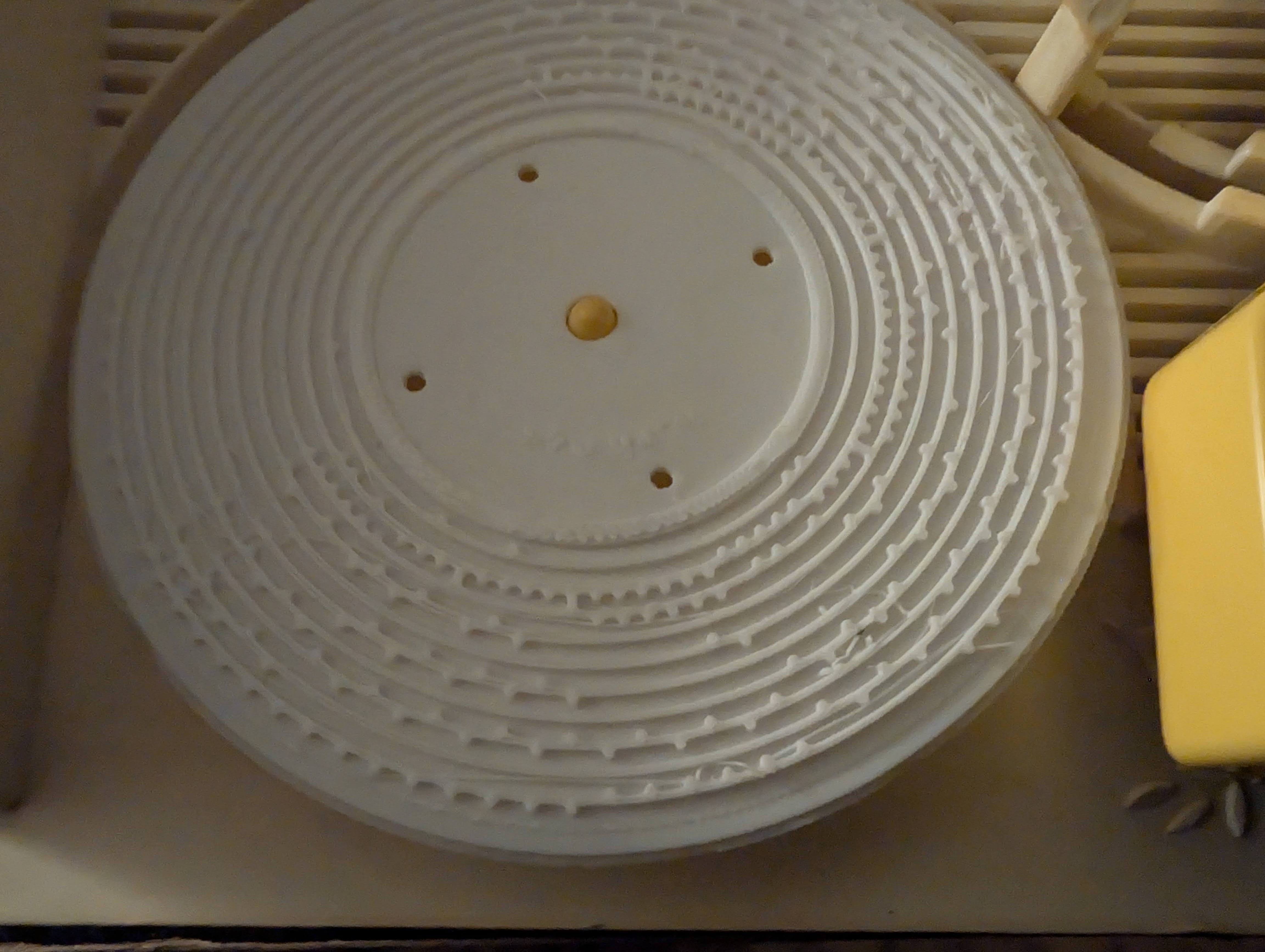
First disc printed — a full ring of note bumps came off the printer and dropped onto the toy. Now dialling in bump height and tolerance so the tines catch cleanly.
First printThe first disc, straight off the printer and onto the toy. Every one of those concentric rings is a track of raised bumps — each bump a note waiting to pluck a tine. Generated from code, printed in white PLA, sitting where a factory disc used to go.It playsThe disc turning on the toy. Rough, imperfect, and unmistakably a melody the printer wrote into plastic. This is the proof: music that never existed as a physical object until the code made it printable.
Credits & honesty
The disc geometry the tool builds on is bbernstone's pin-based OpenSCAD remake on Thingiverse (thing:4484452), itself a remake of the earlier FredPlayer note-based design. The pin-to-pitch table, the twin-tooth pairs, and the ring spacing are their measured work; I ported the mechanism into the browser and wrote the MIDI conversion, the audio preview, and the direct concentric G-code writer around it. And the plain truth: the generated G-code hasn't yet been run to a finished, verified print on a real machine — the design half works, and the printing half is still on the bench.